Best QR menu software in India (2026)
Slatemenu, DineCard, QRSeva, MenuTiger and Petpooja compared on price in rupees, Indian languages, veg marks, ordering and what happens when you stop paying. Checked against each company’s own website.
We make Slatemenu, so read this knowing that. We’ve tried to be fair: every price and feature below for other tools comes from their own websites, checked on 7 October 2026, and where a site doesn’t say something we’ve written "not listed" rather than guessing. Prices change, so check before you pay.
The short answer
| Slatemenu | DineCard | QRSeva | MenuTiger | Petpooja | |
|---|---|---|---|---|---|
| Price | ₹299 a month or ₹2,499 a year | ₹99 a month or ₹999 a year | ₹199 a month or ₹1,788 a year | Free plan; paid from US$17 a month | Not published |
| Free trial | 14 days, no card | 14 days, up to 100 dishes | 14 days, no card | 14 days on paid plans | Demo on request |
| Builds the menu from a photo | Yes | Yes | Yes | Not listed | Not listed |
| Indian languages for diners | 9, plus English | "15+" | "23-language translation" | Not listed | Not listed |
| Veg and non-veg marks | Yes, with a veg-only filter | Not listed | Yes, as tags | Not listed | Not listed |
| Diners order from the table | No, menu only | Not listed | Site shows ordering from the seat, paying at the counter | Yes, with online payment | Yes, with Scan and Order |
| Renews automatically | Never | Not stated | Only if you turn it on | Subscription | Not stated |
If you only need diners to read your menu, the first three are the closest match, and DineCard is the cheapest. If you want diners to order and pay from their phone, look at MenuTiger or a billing system like Petpooja instead.
What to look for
Does it read your paper menu for you?
Typing in 150 dishes with their half and full prices takes an evening. Tools that read a photo of your menu get you most of the way in a few minutes, and you fix the rest.
Prices in rupees, and how you pay
Some tools bill in US dollars on an international card. Indian tools usually take UPI and net banking through Razorpay. Check whether the plan renews and charges you by itself.
Veg and non-veg marks
Indian diners look for them before anything else. A menu without them leads to the same question at every table.
The languages your diners read
English works for most city menus. If many of your customers read Hindi, Tamil or Marathi faster, a translated menu helps them order without asking.
What happens when you stop paying
On Slatemenu and DineCard, the menu goes offline when your plan or trial ends, and the QR code on your tables opens a "not available" page until you pay. Ask the others the same question before you print anything.
Slatemenu
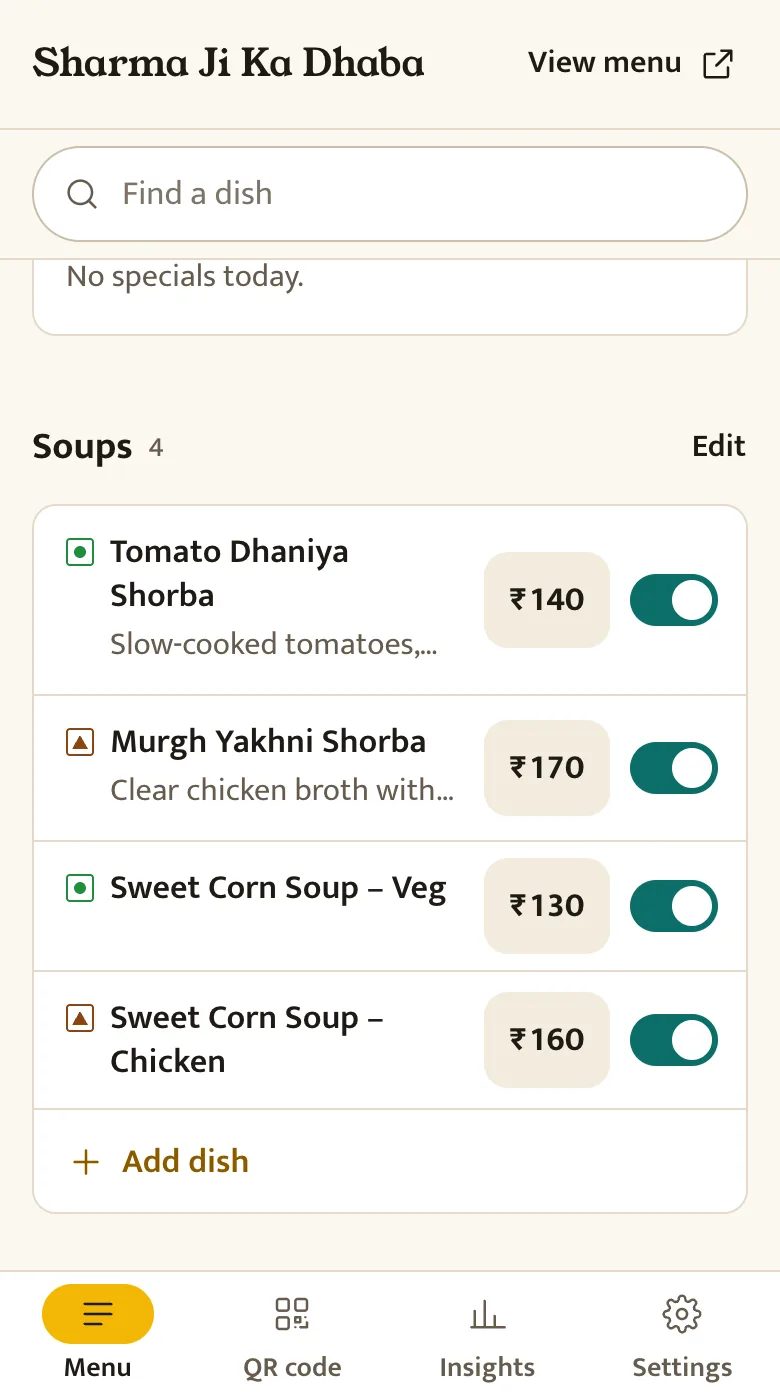
Slatemenu is the one we make. You photograph your menu, check what it read on one screen, and print a table tent, poster, sticker or door sign with your QR code on it. Diners get a menu built for phones, with veg, non-veg and egg marks, filters for Jain, vegan, gluten-free and no nuts, and a switch to Hindi or eight other Indian languages if you turn them on.
From the owner’s side, you change a price or hide a sold-out dish from your phone, put a dish at the top as today’s special, and show sections like breakfast only at set hours. There’s a "Review us on Google" button at the end of the menu, and Insights shows how many people opened your menu and which dishes they looked at.
It doesn’t take orders or payments, and it doesn’t show dish photos. It costs ₹299 a month or ₹2,499 a year, paid in advance by UPI, card or net banking, and never renews on its own.
DineCard
DineCard also builds your menu from a photo or PDF, and its site says it works with "15+ Indian languages" and handles half and full plate prices. It lists offers and discounts, a WhatsApp and Instagram menu button, and a link of the form yourname.dinecard.in. Analytics and dish photos are in the paid plans.
It’s the cheapest here at ₹99 a month or ₹999 a year. The free trial is 14 days with up to 100 dishes and 10 categories. Its site doesn’t mention veg and non-veg marks or ordering. We’ve compared it with Slatemenu in more detail in Slatemenu vs DineCard.
QRSeva
QRSeva reads your menu from a photo too, and offers translation into 23 languages, veg, non-veg and gluten-free tags, three menu designs and three QR sticker designs, dish photos, and scan tracking. It says it serves restaurants in India, Nepal and the Gulf.
It costs ₹199 a month, or ₹1,788 a year (about ₹149 a month), paid in advance through Razorpay. It only renews if you switch renewal on. Its home page shows diners ordering from their seat and paying at the counter; ask QRSeva what that involves before you rely on it. More in Slatemenu vs QRSeva.
MenuTiger
MenuTiger is an international tool built around ordering. Diners order from the QR menu, and paid plans take online payments through Stripe and PayPal. There’s a free plan for one store with up to seven menu categories and 200 QR orders a month. Paid plans start at US$17 a month, with a 14-day trial.
It suits a café that wants table ordering without a full billing system. Prices are in US dollars, and Stripe and PayPal are less common for Indian diners than UPI, so check how payments would work for you.
Petpooja
Petpooja is a restaurant billing (POS) system used widely in India. QR ordering, which it calls Scan and Order, sends the diner’s order straight to your billing counter and kitchen. That makes sense if you already bill on Petpooja or want one system for billing, stock and online orders.
It’s a much bigger product than a QR menu, and the price reflects that. Petpooja doesn’t publish its prices; you get a quote from their team.
The free option: a PDF and a QR code
If your menu rarely changes, you can put a PDF online and make a free static QR code for it. It costs nothing, but diners have to zoom in on their phones, and every price change means a new file. We wrote a step-by-step guide, including the mistake that makes printed codes stop working.
How to choose
- If you just need a menu diners can read, and price matters most, try DineCard.
- If many of your diners read a regional language and you want dish photos, try QRSeva.
- If you want veg marks and diet filters, print designs ready to take to a print shop, and a menu you can run from your phone, try Slatemenu.
- If you want diners to order and pay from the table, try MenuTiger for a small café, or ask Petpooja if you need a billing system too.
All three Indian menu tools have a 14-day free trial, so the quickest way to decide is to take a photo of your menu and try two of them on the same afternoon.
Questions
Which QR menu software is free?
MenuTiger has a free plan with limits on categories and orders. The others are free for 14 days. A PDF menu with a static QR code is free forever.
Do I need table ordering?
Many small restaurants don’t. Diners read the menu on their phone and order with the waiter as usual. Table ordering helps when you’re short of staff or have a self-service counter.
Can I switch tools later without reprinting QR codes?
Usually not. Each tool’s QR code opens that tool’s link, so moving means printing new codes. Pick one you’re happy to keep, and use the free trial properly before you print.